

Quick Start
Graphsignal is a GPU profiler for AI agents to autonomously optimize inference performance across models, engines, and GPUs. It observes an inference engine or any GPU application from a sidecar process and exposes everything it measures through a local JSON API — everything an agent needs to profile, change flags or code, and measure again.
The profiler runs entirely locally: it listens on 127.0.0.1 by default and sends no profiling data anywhere else unless you opt into the production feedback loop.
Installation
Section titled “Installation”The default way to start is to give the profiler’s skill to an AI agent — the skill is self-contained, so the agent installs the profiler, runs the workload under it, and reads the results itself:
# Claude Codemkdir -p ~/.claude/skills/graphsignal && curl -fsSL \ https://raw.githubusercontent.com/graphsignal/graphsignal/main/SKILL.md \ -o ~/.claude/skills/graphsignal/SKILL.mdOther agents can be pointed at SKILL.md directly.
Then ask for the outcome you want — “use graphsignal to optimize the latency of this vLLM server” — and the agent runs the loop: benchmark, profile, read the signals, change flags or code, measure again. See the AI Optimization guide for the workflow.
To install by hand, install as an isolated uv tool so it doesn’t pollute the workload environment:
UV_TOOL_BIN_DIR=/usr/local/bin uv tool install 'graphsignal[cu12]' # CUDA 12.x# orUV_TOOL_BIN_DIR=/usr/local/bin uv tool install 'graphsignal[cu13]' # CUDA 13.xUV_TOOL_BIN_DIR=/usr/local/bin puts graphsignal-run on PATH for every shell, including non-interactive scripts and containers. pip install 'graphsignal[cu12]' works too.
The cu12/cu13 extras are Linux-only and only needed for GPU profiling. On AMD, install without an extra — uv tool install graphsignal; GPU profiling goes through AMD’s rocprofiler-sdk, which ships with ROCm 7+.
Then wrap your launch command with graphsignal-run:
graphsignal-run vllm serve <model> --port 8001Works with any command:
graphsignal-run sglang serve --model-path <model> --port 8000graphsignal-run trtllm-serve <model> --port 8000graphsignal-run python my_app.pySee the Profiler CLI reference for the options and environment variables, and the integration pages for engine specifics:
Optimization loop
Section titled “Optimization loop”While the workload runs, the profiler serves everything it measures at:
curl -s http://127.0.0.1:18259/signalsThe response contains:
context— run and host identity tags.metrics— every metric as its latest snapshot: gauges report the current value; counters report cumulative totals; histograms report exactcount/sum/min/maxplusmeanandp50/p95computed from their bins; profiles report per-frame cumulative values (e.g. time per kernel), sorted descending.errors— the most recent warnings and errors, including exceptions extracted from engine console output.resources— hosts, processes (with command lines), and GPU devices.
null means not measured; 0 means measured zero. The endpoint lives as long as the profiled workload.
The endpoint is what closes the loop: an AI agent launches the workload under graphsignal-run, polls /signals under load, reads which kernels, transfers, or synchronization dominate, changes flags or code, and measures again. See the AI Optimization guide for the full workflow.
Live view
Section titled “Live view”graphsignal-top is the same endpoint for people: a top-like terminal view of the workload, refreshed every second. Run it in a second terminal while the workload is up:
graphsignal-top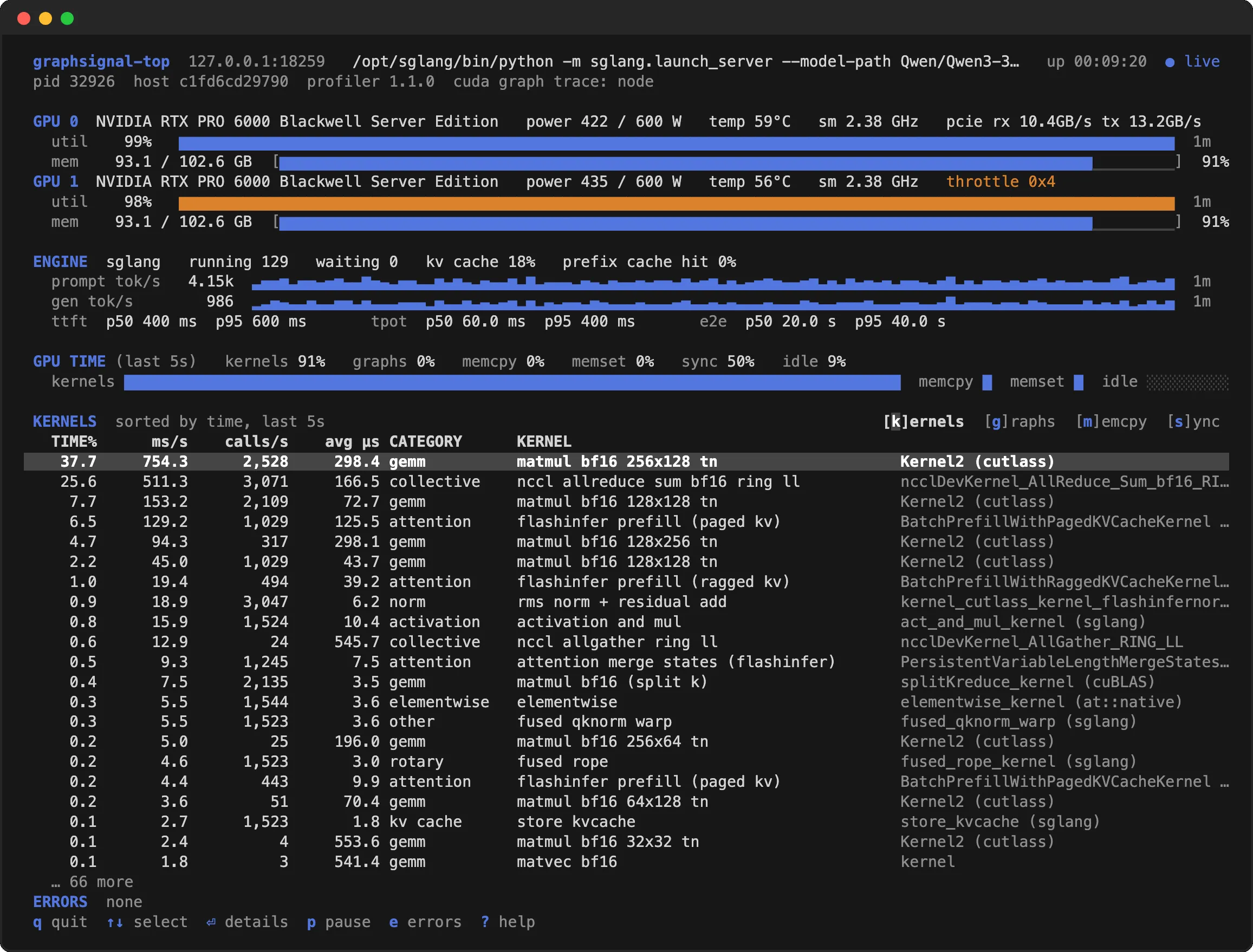
Per GPU: utilization over time, memory, power, temperature, clocks, PCIe traffic, XID errors and throttling. The engine block comes from the scraped Prometheus metrics: running and waiting requests, KV-cache usage, token throughput over time, and TTFT / TPOT / end-to-end latency quantiles. Rates and the kernel ranking cover the last 5 seconds; ⏎ opens a kernel’s details with its full symbol and totals since start. For a workload on another machine, start its profiler with --listen-host and point the view at it with --host and --port; --once prints a single frame instead of the interactive view. See the Profiler CLI reference for the options and keys.
GPU probes
Section titled “GPU probes”Add probes to a library, application, or CUDA/HIP kernels — by hand, or by an AI agent instrumenting the code it optimizes — with a vendorable C++ header. Probe values appear in /signals automatically, alongside the built-in metrics. See the GPU Probes guide.
Production feedback loop
Section titled “Production feedback loop”Optionally, the profiler can upload its signals to Graphsignal, so production behavior feeds back into development: AI agents retrieve production metrics, errors, and resources from the server via the Signals API and use them to optimize the workload.
Enable it by setting an API key before launching:
export GRAPHSIGNAL_API_KEY=<api-key>graphsignal-run vllm serve <model> --port 8001Without the key, no profiling data is ever uploaded. With it, the profiler additionally uploads new signals once per second to https://api.graphsignal.com/api/v1/ingest (override the base with GRAPHSIGNAL_API_BASE). The local /signals endpoint works the same either way.
Overhead
Section titled “Overhead”GPU activity is collected with low-overhead CUPTI/ROCm activity APIs inside the workload process; everything else — analysis, statistics, the HTTP endpoint — runs in the sidecar profiler process. None of it needs root or GPU profiling privileges.
Three collection modes, in the order you should reach for them:
- Kernels (default) — just
graphsignal-run. Cheap enough to leave on, including in production. - Graph node trace —
--cuda-graph-trace node, when the default mode puts all the GPU time incuda_graphs_nanosecondsand you need it per kernel. Run it for the investigation, then go back to the default. - ROCm kernel trace —
--rocm-kernel-trace all, the ROCm counterpart. On AMD the default collects transfers, synchronization, telemetry and engine metrics but no per-kernel time, because rocprofiler-sdk charges tens of microseconds per traced dispatch, graph-replayed or not. Switch it on to rank kernels, then back off. Not for production. - GPU probes — instrument the code, once a kernel is named and the question is which part of it. Safe to leave in production; cost follows how densely you record.
See Profiler Overhead for what each mode costs and how it was measured.
Security and Privacy
Section titled “Security and Privacy”The profiler runs as a sidecar process and does not require root or elevated privileges. Its HTTP endpoint binds to 127.0.0.1 by default (an explicit --listen-host can expose it for remote access), and it opens outbound connections only when you set an API key — and only to the server it reports to. Content and sensitive information, such as prompts and completions, are not recorded.
See Security and Privacy for details.